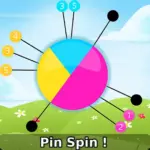



























Pin Spin! is a fast, timing-first online/browser game where your whole job is to place pins at the right moment without causing a collision. It looks simple, but the tension comes from rotating motion, tight spacing, and the way one bad throw can ruin a perfect run. This page breaks down the core loop, the fail conditions, and practical ways to keep your accuracy steady when the speed ramps up.
Play Now: Launch Pin Spin! in your browser and start with short, controlled throws.
Tech note: Pin Spin! is typically offered as an HTML5 game that runs directly in modern web browsers.
Key Features
- One-tap timing loop: throw pins into a spinning target without hitting existing pins.
- Difficulty ramps through faster rotation, reversals, and tighter spacing between safe slots.
- Quick restarts encourage repetition, pattern learning, and cleaner muscle memory.
- Clear fail state makes improvement measurable: one collision ends the attempt.
- Minimal UI keeps focus on timing windows, rhythm, and visual cues.
- Works well as a short-session online/browser game on desktop or mobile.
What is Pin Spin!?
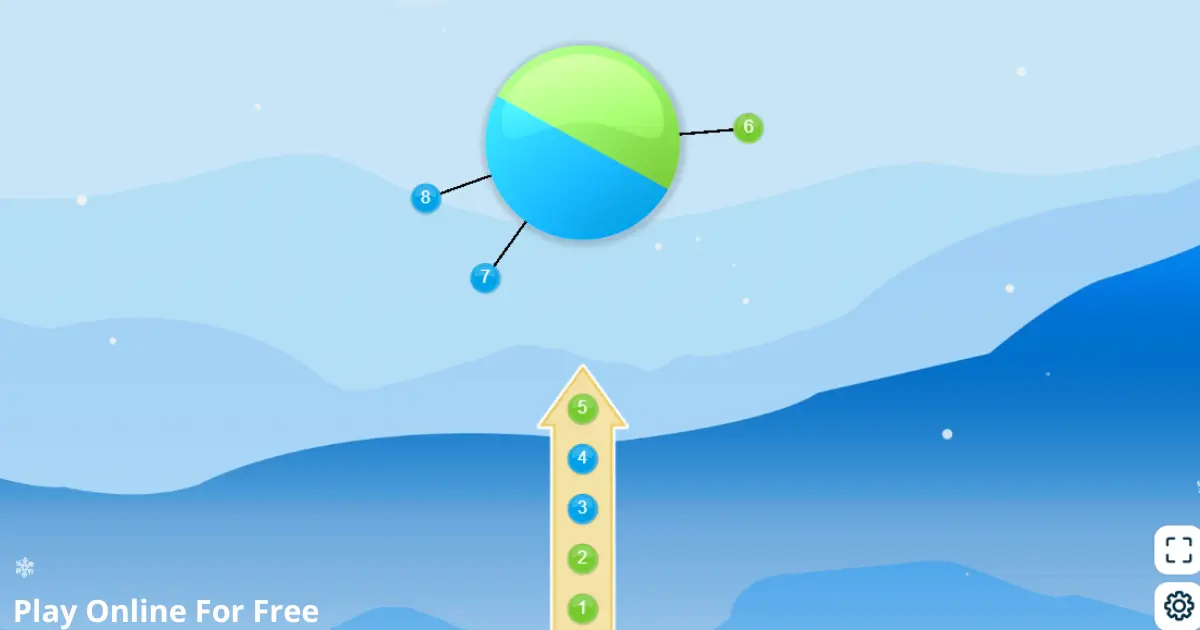
Pin Spin! is an arcade timing puzzle built around a single high-pressure decision: commit a pin while the target is rotating, and make sure it lands in an open gap. The core loop is simple: aim by timing, tap to throw, stick the pin, and repeat until you complete the stage goal (often a set number of pins).
The tactical dynamic comes from rotation speed and spacing. When the wheel accelerates or changes direction, your eyes want to “lead” the motion, but your finger often taps late. The best runs feel rhythmic because you are matching a cadence, not reacting to every frame.
What differentiates it from other pin-and-target games is the emphasis on micro timing windows and the way patterns can feel deceptively safe until a late tap places a pin directly into a prior one. In most versions, you progress stage by stage, with later rounds stacking more pins and reducing the margin for error.
How to Play
Your objective is to throw pins into the spinning target and avoid hitting any pin that is already attached. Most stages end when you successfully place a required number of pins, and you lose immediately if your thrown pin collides with an existing pin.
Rules and win/lose conditions
- Win a stage by placing all required pins without collisions.
- Lose the attempt if your pin hits another pin (often an instant fail).
- Some versions add quick “boss” patterns such as speed bursts or direction flips.
Progression and pacing
- Early stages teach the timing window with slower spins and wider gaps.
- Later stages typically increase rotation speed, add reversals, or place pins closer together.
- Improvement comes from repeatable timing, not from random guessing.
Controls
| Action | Desktop (Keyboard/Mouse) | Mobile (Touch) |
|---|---|---|
| Throw pin | Left click (or Space in some versions) | Tap anywhere |
| Restart after fail | Click restart button | Tap restart button |
| Pause (if available) | Esc or on-screen icon | On-screen icon |
Practical cue: If you notice your taps landing “behind” the moving gaps, slow down and throw on a steady beat instead of reacting.
Core Gameplay Mechanics
Main system
When you tap to throw, the game launches a pin toward the center target, and the pin sticks at the target’s current rotation angle. Your safe outcome depends on whether that landing angle is clear. When the target is rotating quickly, the timing window for each open gap shrinks, so consistent rhythm becomes more important than raw speed.
Tactical dynamics
When you see a wide open gap coming toward your preferred timing point, throw early enough that your tap aligns with the moment the gap is centered. If the target reverses direction or changes speed, stop “chasing” the motion. Instead, wait one full rotation cycle to re-sync your internal rhythm before throwing again.
Progression and scaling
As you advance, the game usually increases difficulty by stacking more pins, narrowing the remaining open angles, and speeding up rotation. Some stages may introduce brief speed bursts or direction flips that punish autopilot tapping. The scaling is mostly about visual processing under pressure: you are tracking gaps, predicting the next safe slot, and resisting the urge to spam taps.
Key elements
The key elements are the spinning target, the pinned obstacles you create, and the timing window between pins. Hazards are collisions, sudden pace changes, and moments when gaps look larger than they truly are. The main fail state is a pin-to-pin hit, which ends the run immediately and forces a restart.
Example: If two pins are already close together, treat the “gap” between them as unsafe unless it looks clearly wider than a pin head.
Strategies
Rhythm Lock
Pick a consistent beat and throw only on that beat, even if it feels slower. This reduces late taps caused by hesitation and keeps your throws evenly spaced. Warning: if the target speed changes, pause for a rotation to reset your rhythm before continuing.
One-Gap Commitment
Choose one reference gap and keep placing pins relative to it, instead of scanning every pin each throw. This lowers mental load and stops panic reactions. Warning: if pins start clustering near your reference gap, switch your reference point immediately.
Reset After Reversal
When the wheel reverses direction, do not throw instantly. Wait until you can predict the next approach of a safe gap and your eyes feel stable. This works because reversals trick your brain into misjudging motion. Warning: waiting too long can break your stage tempo, so commit after one clean cycle.
Edge-Spacing Check
Before you tap, check the “edges” of the nearest two pins, not the empty center space. Your pin needs clearance on both sides to land safely. This helps because collisions happen at the edges first. Warning: on fast spins, do this check earlier than you think.
Slow-Start Discipline
In early stages, play as if it is already late-game. Throw with the same care you will need later, aiming for symmetrical spacing. This builds stable habits, so you do not collapse when speed increases. Warning: do not overthink, keep it rhythmic.
Fail Review Loop
After each fail, identify the exact mistake in one sentence (late tap, reversal panic, bad gap read) and restart with a single adjustment. This works because it turns frustration into a repeatable fix. Warning: if you cannot name the mistake, you are tapping too fast.
Decision Flow (Quick Win Rule)
- Did the wheel just speed up or reverse? Yes -> Wait 1 rotation -> Re-find widest gap -> Resume rhythm
- No -> Are pins clustering in one area? Yes -> Switch reference gap -> Place opposite side
- No -> Is the next gap clearly wider than pin head? Yes -> Tap on beat -> Confirm edge clearance
- No -> Skip this pass -> Tap next safe gap
Similar Games
- Core Ball
- Knife Hit
- Pin Circle
- AA (style)
- Ballistic timing shooters (style)
- Core Ball
- Pin Circle
FAQ
Is the pull the pin game safe?
Usually, yes, if you mean mainstream puzzle apps that use “pull the pin” mechanics. Safety depends on where you play and what permissions you grant, not the mechanic itself. Prefer reputable stores, read reviews, and avoid suspicious clones. In a browser, do not install extra extensions just to play.
Which game is No. 1?
There is no single No. 1 game for everyone because rankings change by region, platform, and genre. Different charts measure different things, like downloads, revenue, or active players. If you want the best fit, pick a category (arcade, puzzle, strategy) and try a few top titles to see what clicks.
How to play Steal the Pin?
In most “Steal the Pin” style puzzle games, you pull pins in the correct order so the right item reaches the character while hazards are blocked. The trick is to visualize what will move first when a pin is removed. If lava, enemies, or water are involved, isolate hazards before releasing rewards.
What is the game pin code?
A game pin code is typically a short numeric code used to join a session, room, or quiz game on another device. It is not related to the “pin throwing” mechanic in Pin Spin!. You enter the code on a join screen to connect to the host. Only share codes with people you trust.
Technical
Pin Spin! is commonly presented as an HTML5 browser game (it may use WebGL depending on the host). It should run in Chrome, Firefox, Edge, and Safari on most modern devices. Most mid-range phones and laptops typically handle it smoothly because the visuals are simple and the input is tap-based.
Controls are usually mouse click or a single keyboard key on desktop, and a single tap on mobile. If you are playing the online/browser game version, you can typically start instantly with no download. If input feels delayed, close background tabs and disable heavy browser extensions.
Practical cue: If the game stutters right when you tap, lower your device power saving mode or switch browsers.
Final Verdict
Pin Spin! is a clean arcade timing challenge that rewards calm rhythm and good spacing reads more than frantic speed. Its strengths are the instant clarity of the goal, the satisfying fail-and-retry loop, and the way difficulty ramps through rotation changes and tighter gaps. Its limits are that one-mechanic games can feel repetitive if you want deeper systems.
If you like quick reflex tests, you can also explore Skill.
If you prefer thinking through patterns and timing windows, explore Puzzle.
For a fast session, load the online/browser game and aim for consistent timing, then scale up your pace after you can place pins evenly. When you are ready, jump back in and chase a clean clear.