














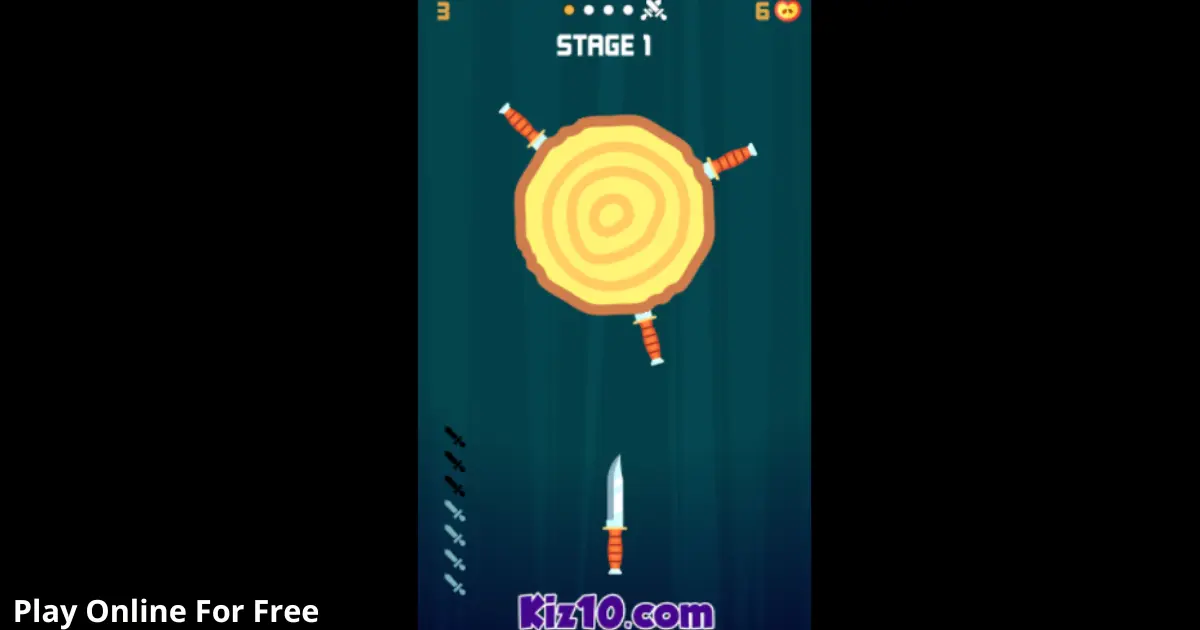
Knife Hit is a fast, timing-based arcade challenge where every throw is permanent. Your goal is simple: stick knives into a spinning target without hitting another blade, then clear stages until you reach tougher pattern rounds that test patience more than reflex.
Play Knife Hit online and use this guide to lock in consistent throws, spot safe windows, and avoid the most common failure patterns.
If you are playing the browser version, Knife Hit is typically an HTML5 game that runs directly in your browser with no download.
Key Features
- One-tap throws with tight timing windows that punish rushed input and panic taps.
- Spinning target patterns that change speed and direction to break muscle memory.
- Stage structure with short rounds that reward focus and reset quickly after mistakes.
- “Boss-style” targets that add hazards and irregular rhythm in many versions.
- Quick progression loop built for short sessions, perfect for an online/browser game.
- Simple rules, high precision, and clear fail states that keep improvement measurable.
What is Knife Hit?
Knife Hit is an arcade skill test built around a single loop: wait for a safe gap, throw, and repeat until the round ends. The tactical dynamic comes from reading rotation tempo and the placement of existing knives on the target, because your next throw must avoid collisions.
What makes Knife Hit game sessions feel different from other tap-to-throw titles is the rhythm pressure. The game encourages you to speed up, but most wins come from slowing down. In most versions, difficulty ramps by changing spin speed, reversing direction, or adding obstacles that make “always throw on the beat” unreliable.
How to Play
Objective, Win and Lose Conditions
Your objective is to land every knife for the current round without hitting any knife already stuck in the target. You clear a stage when you successfully place the required number of knives. You lose the round instantly if your thrown knife collides with another blade or a protected hazard element.
Progression and What Changes
Rounds typically get harder by:
- Increasing rotation speed or adding uneven acceleration.
- Reversing direction mid-round.
- Adding targets with obstacles or protected zones.
- Requiring more knives, which shrinks available safe gaps.
If a stage introduces a “boss” target (common in many builds), treat it like a new ruleset: the pattern is the challenge, not the knife count.
Controls
To throw a knife, use a left click or tap anywhere on the play area with mouse or touch. On keyboard, the Spacebar is used in many browser builds. For pausing or accessing menus, look for an on-screen button or use Esc if supported.
Experience cue: If you notice your throws “feel late,” stop chaining taps. Wait one full rotation and re-sync your timing.
Core Gameplay Mechanics
Main System
When you tap, the game launches a knife toward the spinning target and immediately checks for collision with any stuck knife. If the knife lands cleanly, it becomes a new obstacle for future throws. The round ends when you place the required count, or instantly fails on a collision.
Tactical Dynamics
When you see a narrow gap approaching, do not track the gap itself. Track the knife you must avoid. Aim to throw just after that knife passes your “throw line,” because that creates a predictable spacing buffer. If the target reverses, pause for a half-beat and re-time the next safe window.
Progression and Scaling
When stages advance, patterns usually evolve in two ways: less consistent rhythm and less forgiving space. Faster spins reduce reaction time, while direction switches break habitual cadence. As more knives stick, gaps become smaller and visually busier, so your decision time shrinks even if the speed stays the same.
Key Elements
Key elements are the knives already embedded (your main hazard), the target rotation pattern (your timing constraint), and any protected obstacles on special targets. The main fail state is a knife-on-knife collision. Some versions also treat hitting an obstacle as a fail, even if the blade would otherwise stick.
Strategies
Gap Anchor Method
Pick one “anchor” knife on the target and always time relative to it. Throw right after the anchor passes your throw line, not when the gap looks biggest. This works because your brain tracks one moving object better than empty space. Warning: if the target reverses, reset your anchor.
One-Rotation Reset
If you miss your rhythm, do nothing for one full rotation, then restart with a deliberate single throw. This works because it clears panic and re-establishes a consistent timing window. Warning: do not try this when the pattern has random acceleration; use two rotations if needed.
Two-Step Burst
When the rotation is steady, throw in controlled pairs: one safe throw, micro-pause, then a second throw. This works because pairs build progress without the runaway speed that causes mis-clicks. Warning: if you start “machine-gunning,” stop and go back to single throws.
Knife Cluster Avoidance
Avoid building a cluster of knives in one area. If you can choose between two gaps, place your next knife to keep spacing even around the target. This works because later throws need multiple usable lanes. Warning: do not overthink it, pick the safer window first.
Reverse-Ready Pause
When you suspect a direction change, hold your input until you see the reversal happen, then throw on the first predictable pass after it stabilizes. This works because reversals are the most common cause of “auto-pilot” collisions. Warning: do not throw during the instant of reversal.
Edge-Safe Timing
Throw slightly earlier than you think when gaps are tiny, aiming for the center of the safe zone rather than the trailing edge. This works because late throws clip the next knife as the target rotates into your path. Warning: if you throw too early, you can still hit the previous knife.
Decision Flow (Quick Win Rule)
Do you see a direction switch coming? If yes, then wait for the switch, perform a One-Rotation Reset, and use single throws. If no, are gaps visually crowded? If yes, use the Gap Anchor Method and place for even spacing. If no, use a Two-Step Burst and stop if rhythm slips.
Experience cue: If your pointer or thumb is drifting, pause and re-center your hand position before the next throw.
Similar Games
- Core Ball – Timing-based shots into a rotating core with limited safe slots.
- Pin Spin ! – Fire pins into a spinner while managing spacing and speed changes.
- Pin Circle – Precision throws around a circle with rising pattern complexity.
- Core Ball
- Pin Spin !
If you want more fast reaction games that reward timing, try Skill.
If you prefer pattern reading and spacing puzzles, explore Puzzle.
FAQs About Knife Hit
Is Knife Hit appropriate for kids?
It can be appropriate for many kids, but it depends on age and sensitivity. The gameplay is abstract and cartoon-like, yet it still features knives as the main theme. If you are unsure, supervise the first few rounds and consider disabling ads or in-app prompts if your version includes them.
Is Knife Hit available on iOS?
Yes, Knife Hit is available on iOS as an app in regions where it is listed. The mobile app experience can differ from an online/browser game version, especially around ads, unlocks, and progression pacing. If you want the iOS version, use the official App Store listing linked below.
What is Knife Hit about?
Knife Hit is about landing a set number of knives into a rotating target without colliding with existing blades. Each successful throw makes the next throw harder because it adds a new obstacle. Many versions add special targets with irregular rotation to test timing discipline rather than speed.
How to beat the fan in Knife Hit?
To beat fan-style targets, prioritize reading the safe lanes created by the moving blades, then throw only when a lane is fully clear. In most versions, quick bursts fail because the lane closes fast. Use single throws, and reset for one full rotation after any near-miss.
Is Knife Hit online the same as the app?
Not always. Knife Hit online builds can vary by site and may change menus, ads, skins, or progression structure. The core rule set is usually the same: avoid knife collisions and clear a required count. If something feels different, rely on the timing principles rather than specific unlock assumptions.
Do Knife Hit PC versions require installation?
Usually no, if you are playing Knife Hit PC in a browser, it runs like an HTML5 game with no download. However, “Knife hit download” listings can also refer to standalone apps or emulators. If you want browser play, choose a web version rather than an installer.
Technical
Knife Hit is commonly offered as an online/browser game, and many web builds run as an HTML5 game (sometimes using WebGL for smooth animation). Supported browsers are typically Chrome, Firefox, Safari, and Edge. Most mid-range devices should run it smoothly, but background tabs and heavy extensions can add input lag.
For best results on desktop, use a mouse click rather than a trackpad tap if you notice double-inputs. On mobile, keep your thumb still and tap with a consistent part of your finger. If you are playing in-browser, it generally requires no download, but performance varies by the site hosting the build.
Final Verdict
Knife Hit is a clean, high-clarity arcade loop: you always know why you failed, and you can fix it with a specific timing adjustment. Its main limitation is repetition, because the core action never changes, only the pattern pressure does. If you like quick skill checks, pattern reading, and measurable improvement, this free arcade game style fits perfectly.
If you want a short-session online/browser game that rewards patience more than spam tapping, play Knife Hit online and use the strategies above to keep your throws consistent.